
Lone Star College-Kingwood Business Services and Payment Center
Helping students, employees, and partners with payments with payments, refunds, sponsorships, and account support.
Message from the Business Services Manager
Welcome to the Business Office at Lone Star College–Kingwood. At Lone Star College–Kingwood, Business Services & Payment Center is committed to providing accurate, timely, and service-oriented support to students, faculty, staff, and campus partners. Our team works collaboratively to ensure financial processes are clear, efficient, and aligned with the needs of our campus community. From student account assistance to departmental financial support, we strive to create an environment where questions are answered, concerns are addressed, and every interaction reflects our commitment to service, accountability, and student success.
Andrew Gonzalez, Business Office Manager, LSC–Kingwood
About Business Services & Payment Center
At Lone Star College–Kingwood, the Business Office—also referred to as Business Services & Payment Center—provides comprehensive financial and operational support to students, faculty, staff, and campus partners. Our team is committed to delivering accurate, timely, and service-oriented solutions, from student account assistance to departmental financial processes. We strive to create an environment where processes are clear, questions are answered, and every interaction reflects our commitment to service, accountability, and student success.
Jump to Topics:
LSC-Kingwood Business Office Locations
How to Enroll in a Payment Plan
Payment Plan Information
Dropped for Non-Payment? Don’t Panic.
Disbursement vs Refund
Coyote Care Center: Judgement FREE Safe Space!
LSC-Kingwood Business Office Locations
Email: kwbusinessoffice@lonestar.edu
Locations: Kingwood, East Aldine Center, Atascocita Center
LSC-Kingwood (Main Campus)
Address: 20000 Kingwood Dr, Kingwood, TX 77339
Phone: 281.312.1581 (Credit cards are not taken by phone)
Room: SCC 144
| Monday - Thursday | 8 a.m. - 6 p.m. |
| Friday | 8 a.m. - 5 p.m. |
| Saturday | 8 a.m. - 2 p.m. |
| Sunday | CLOSED |
LSC-Atascocita Center
Address: 15903 W Lake Houston Pkwy, Houston, TX 77044
Phone: 281.312.1581 (Credit cards are not taken by phone)
Room: AC 105
| Monday - Thursday | 9 a.m. - 2 p.m. | In-person virtual option (shush booth) available 8 a.m.- 6 p.m. |
| Friday | 8 a.m.- 5 p.m. | Friday in-person virtual option(shush booth) available |
| Saturday - Sunday | CLOSED |
LSC-East Aldine Center
Address: 2430 Aldine Mail Rt., Houston, Texas 77039
Phone: 346.378.7512 (Credit cards are not taken by phone)
Room: 102G
| Monday - Thursday | 8 a.m. - 5 p.m. | In-person virtual option available Monday through Friday 8-6pm. |
| Friday - Sunday |
CLOSED |
Meet the Business Office Team
Business Office Leadership

Andrew "Drew" Gonzalez
Business Services Manager
Andrew.G.Gonzalez@LoneStar.edu

Tanganiqa Johnson
Coordinator I
Business Operations
Tanganiqa.Johnson@LoneStar.edu

Nathanael "Nate" Mayse
Specialist III

Sobia Hussain
Specialist III

Socorro Burciaga
Specialist III
How Can We Help?
Student Services Resources
|

Disbursement vs Refund
Disbursement is when the Financial Aid Office transfers the anticipated aid for each semester to your student account. You'll receive an email when this occurs. For questions regarding disbursement, please see the Financial Aid Office.
A refund is generated after all allowable institutional charges are deducted from your disbursement. It is sent via the original payment method, electronic refund profile, or paper check. Verify your address and refund profile are set up before refunds start. For questions regarding refunds, please see the Business Office. Refunds and disbursement don't occur on the same day.
Email: kwbusinessoffice@lonestar.edu
Payment Plans
Nelnet Installment Payment Plan Information
The Lone Star College offers online installment payment plans only through the Lone Star College Payment Plan Management System. Installment payment plans are a convenient way to budget and pay tuition and fees.
Enrolling in an installment payment plan online offers convenience and flexibility:
- Enroll in a tuition and fees payment plan online excluding mini-mester classes and Summer semester classes
- View a list of tuition and fee charges for the plan on your online budget worksheet
- Make a payment online
- Schedule automatic installment payments using a credit card, checking or savings account
- Receive email reminders about upcoming payments
- Receive email notifications as your plan adjusts for changes in enrollment
- Set up authorized users to view payment information and make payments
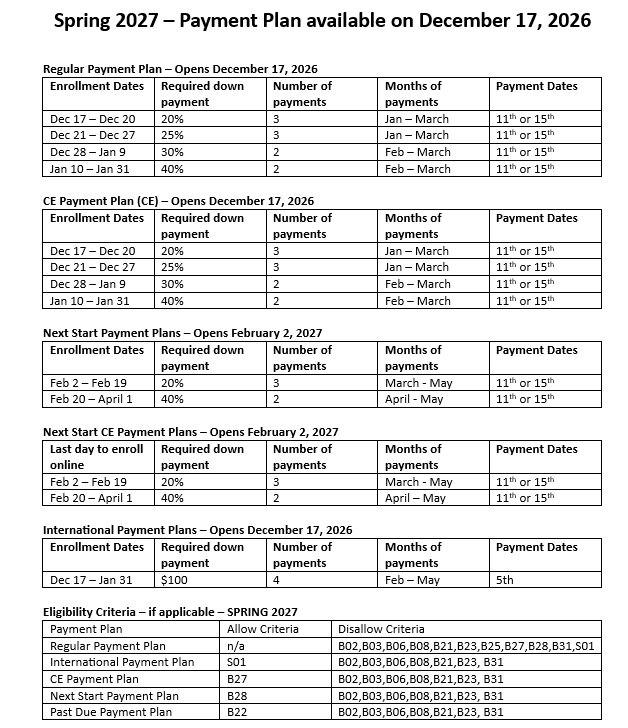
Payment Plans Available for 2026
Dropped for Non-Payment? Don’t Panic.
Re-register and secure your classes today!
If you were dropped from your classes due to non-payment, there may still be time to re-enroll. In many cases, you can add your classes back by paying your balance in full or enrolling in a payment plan.
Log in to My.LoneStar.edu to re-register for your classes and take action today.
Re-Register and Pay Today
Secure your schedule by re-registering and completing payment or enrolling in a payment plan.
- Log in to My.LoneStar.edu
- Add your classes back to your schedule
- Pay your balance or enroll in an available payment plan
Acting quickly gives you the best chance of keeping your classes.
Reasons You May Have Been Dropped for Non-Payment
Students can be dropped for non-payment for several reasons, including:
- An existing balance on your student account
- Financial aid that was incomplete, delayed, or not fully processed
- A payment plan was not set up before the deadline
- Tuition waivers or third-party payments were not applied in time
Each student’s situation is different. Reviewing your account in My.LoneStar.edu will help clarify what happened.
Need Help Re-Enrolling?
If you are unsure what steps to take or need assistance re-registering, please contact your academic or workforce advisor as soon as possible. Advisors can help you understand your account, review your options, and guide you through next steps. Visit LoneStar.edu/HNAdvising for more information about contacting your Advisor.
How to Enroll in a Payment Plan
Using Nelnet for the First Time
How to Enroll in a Payment Plan
PDF Instructions: Enrolling in a Nelnet Payment Plan
PDF Instructions: Enrolling in a Nelnet Past Due Payment Plan Job Aid
Spanish PDF Instructions: Enrolling in a Nelnet Payment Plan, Enrolling in a Nelnet Past Due Payment Plan Job Aid
Making a Credit Card Payment with Nelnet
PDF Instructions: Making a Credit Card Payment in Nelnet
Spanish PDF Instructions: Making a Credit Card Payment in Nelnet
Making an Online Check Payment with Nelnet
PDF Instructions: Making an Online Check Payment with Nelnet
Spanish PDF Instructions: Making an Online Check Payment with Nelnet
How to Set Up a Refund Profile Nelnet
PDF Instructions: How to Set Up a Refund Profile Nelnet
Spanish PDF Instructions: How to Set Up a Refund Profile Nelnet
Coyote Care Center: Judgement FREE Safe Space!

The Coyote Care Center is a judgement free safe space where students can ask for help. Grab and go drinks and snacks are available to students, and food pantry items are available for students and their families. The Coyote Care Center also has hygiene products, school supplies, and clothing for students who are in need, as well as community assistance and campus resource referrals.
Beginning Spring 2026, all visitors will need to register with PantrySoft before utilizing Coyote Care Center resources. Register in advance to make your visit quick and easy. Register here:https://app.pantrysoft.com/register/lonestarcollege
Students can also request help from the Care Center online by using their MyLoneStar portal to create a Care Request: https://www.lonestar.edu/care.htm
For more information please contact: KC-CareProgram@lonestar.edu.
Please consider supporting our Care Centers: https://www.lonestar.edu/giving/egc.